
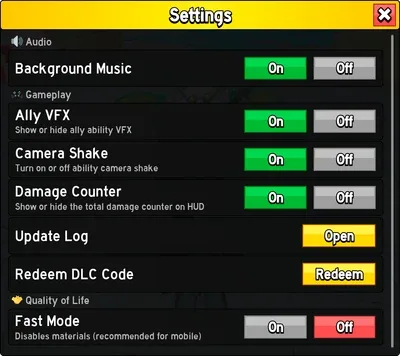
The Settings menu is a game interface, placed next to the  Crew option for
  Pirates and the Ally option for
  Marines. It groups together the main settings: music, ally visual effects, camera shake, damage counter, codes and
  Fast Mode.
The available settings
- Background Music: turns on or off the background music. Useful if you prefer to listen to your own music or limit distractions.
- Ally VFX: when two
 Pirate players are allied and the option is enabled, you no longer see your ally's attacks, which helps reduce lag.
 - Camera Shake: when disabled, it removes all screen shaking. Turning it off is one of the best reflexes before doing PvP, to maintain consistent combos.
 Damage Counter: displays or hides the damage counter dealt.
 Update Log: displayed information about past and current updates. Removed after the 6-week update, it may return next time.
 Codes: allows you to enter promotional codes to get rewards (
 Money, 2x EXP boost, etc.). Codes come out regularly and expire after a while.
- Fast Mode: removes all textures to significantly improve performance and reduce lag, especially on mobile.
Good to know
- Before a PvP fight, turn off Camera Shake: your combos will be much more consistent.
- If the game lags, enable Fast Mode (and Ally VFX if you're playing as an ally) to gain better fluidity.
 Ranked PvP (2v2)
 Rare
Rare Rare Artifact Key
 Rarities
 Recommended Quest
 Red Army
 Rip Family
 Safe Zone
 Sea Danger Level
 Sea Exploration Group
 Server Browser
 Settings
 Shop
Shop Skins
Skins Slayer Skin
 Stats
Stats Striking
 Stun
Stun Subclasses
 Summer Chest
 Summon Sea Beast
 Sunken Chest
 Swords
 Teleportation